You've probably tried three or four apps already, jumping between free trials and tutorial videos just to nail a simple jump cut. Finding the best video editor for tiktok videos shouldn't take longer than actually filming the content, but most creators waste hours on tools that fight them instead of helping them ship. The right app matters less than what you do with it, but the wrong one will bury you in menus while your competitors post three times a day.
This list skips the generic "top 10 apps" filler and gets straight to what actually works in 2026: apps built for mobile-first editing, fast caption syncing, and export settings that match what the TikTok algorithm rewards right now. We tested each one for speed and learning curve, not just feature count, because a tool you abandon after a week helps nobody.
We cover five editors, from beginner-friendly options to ones built for creators editing daily. Each entry includes pricing, standout features, and who it fits best, whether you're a solo founder recording between meetings or a brand team pushing out a dozen clips a week. At SocialRevver, we build production systems around tools like these every day, so we know which ones hold up once the volume gets real.
1. CapCut
CapCut sits at the top of this list because it does one thing better than almost anyone else: it edits native to TikTok's format without forcing you to learn a desktop-grade interface first. Owned by ByteDance, the same company behind TikTok, it's built with an obvious understanding of what the algorithm rewards, from aspect ratios to caption placement. That relationship shows in small details, like templates that mirror trending edit styles the week they start trending.
Key features
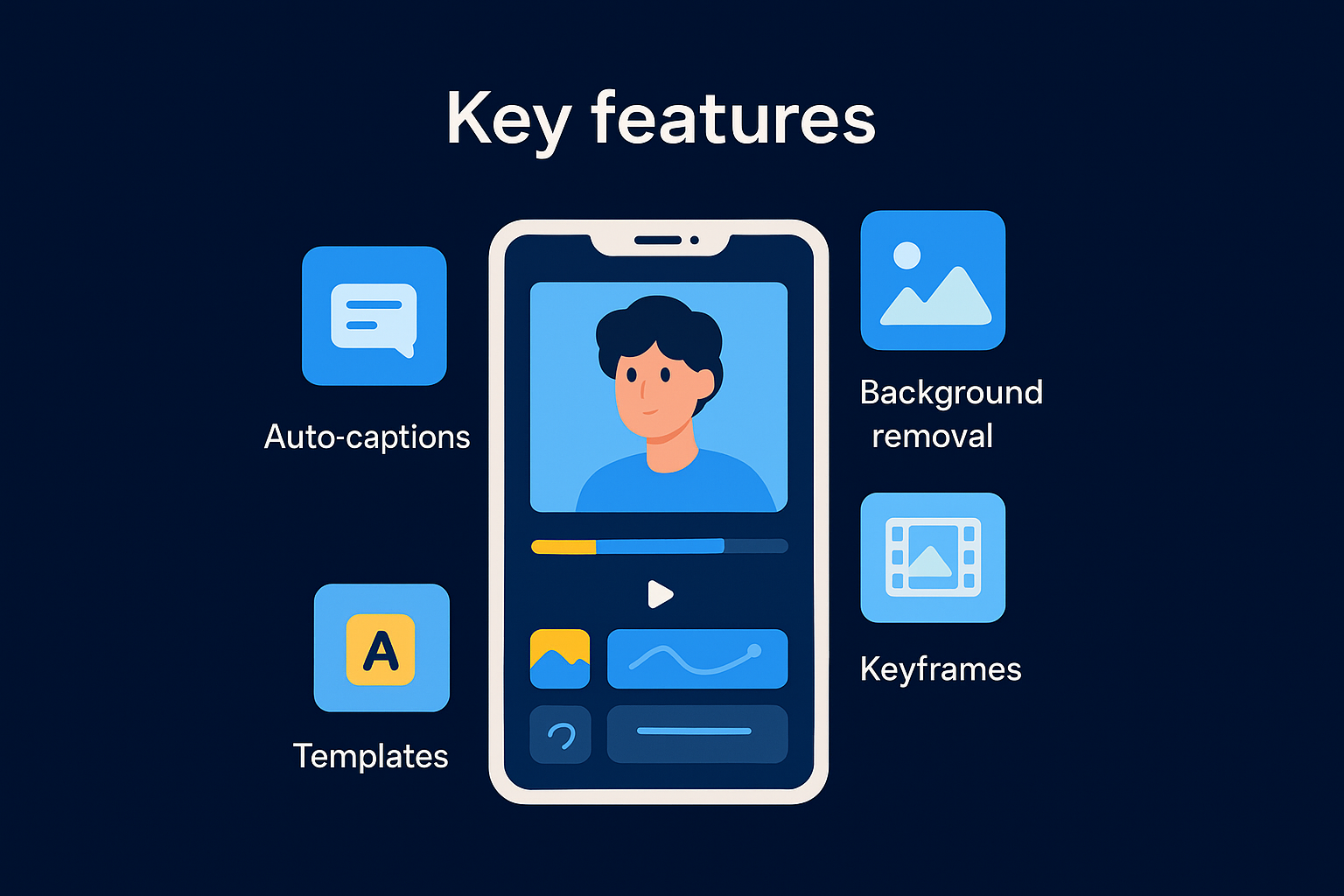
The app packs in auto-captions with word-level syncing, a template library that updates constantly, and a keyframe-based motion tool for text and stickers. You also get a built-in green screen and background remover, speed ramping, and a growing set of AI tools for voice cloning and script-to-video generation. None of this requires plugins or separate purchases; it's all in the free tier.
Who it's best for
CapCut fits solo creators and small teams who need to turn around a video in under 20 minutes on a phone, between calls or on a commute. It's less suited to teams managing brand consistency across dozens of videos a week, where template drift becomes a real problem.
If speed matters more than control, CapCut wins by a wide margin.
Pricing
The free version covers nearly everything most creators need. CapCut Pro runs about $7.99/month or $59.99/year, unlocking 4K export, extra AI features, and premium templates and fonts.
Pros and cons
| Pros | Cons |
|---|---|
| Fast, intuitive mobile interface | Limited color grading tools |
| Deep TikTok-format integration | Templates can feel repetitive at scale |
| Strong free tier | Cloud sync issues reported on older devices |
| Frequent trend-driven updates | Less control over audio mixing |
CapCut works well as a starting point, but teams scaling volume eventually run into its ceiling. If your content calendar depends on dozens of videos a week with consistent branding, you'll need either a stricter template system or a production partner handling the editing layer for you.
2. VEED.io
VEED.io built its reputation as a browser-based editor, but it's quietly become one of the strongest web-first tools for TikTok content, especially for creators who edit on a laptop between meetings rather than on a phone. It runs entirely in your browser, no downloads, no app store updates breaking your workflow mid-project.
Key features
Subtitles generate automatically with solid accuracy across dozens of languages, and the AI script-to-video tool turns a written outline into a rough cut in minutes. VEED also includes a translation feature that dubs your voice into other languages, useful if you're testing TikTok's international reach. Brand kits let you lock fonts, colors, and logos across every export.
Who it's best for
Founders and marketing teams who need consistent branding across formats (TikTok, LinkedIn, YouTube Shorts) from one project will get the most value here. It's less ideal for creators who only edit on mobile, since the experience is built around a desktop browser.
Brand consistency across platforms is where VEED earns its keep.
Pricing
A free plan exists but watermarks exports. Paid plans start around $18/month billed annually, scaling up for teams needing more export minutes and seats.
Pros and cons
| Pros | Cons |
|---|---|
| Strong multi-language subtitles | No native mobile app |
| Solid brand kit tools | Free tier watermarks everything |
| Good for multi-platform exports | Pricier than mobile-first apps |
3. InShot
InShot has been a staple on app stores for years, and it earns that staying power by staying simple. It's a lightweight mobile editor that trims the fat other apps pile on, making it a solid pick if CapCut's constant feature updates feel like clutter rather than help.
Key features
The app covers the basics well: trimming, speed control, transitions, and a decent music and sound effects library cleared for commercial use. It also includes canvas sizing presets built specifically for TikTok, Reels, and YouTube Shorts, so you're not guessing at aspect ratios. Filters and color adjustment tools are simple but effective for quick polish.
Who it's best for
InShot suits casual creators and small business owners who post a few times a week and want something that opens fast and exports faster. It's not built for teams managing complex multi-clip sequences or heavy motion graphics work.
When you just need clean cuts without a learning curve, InShot gets out of your way.
Pricing
The free version adds a watermark and limits some effects. InShot Pro costs around $3.99/month or $17.99/year, removing the watermark and unlocking the full effects library.
Pros and cons
| Pros | Cons |
|---|---|
| Simple, fast interface | Fewer AI-driven features |
| Affordable pro tier | Limited advanced editing tools |
| Good preset ratios for social | Free tier watermark |
4. VN Video Editor
VN Video Editor earned its following by giving mobile creators desktop-level timeline control without the desktop price tag. It's a free, cross-platform editor that works on iOS, Android, and desktop, syncing projects across devices so you can start a cut on your phone and finish it on a laptop.
Key features
VN offers a multi-track timeline with keyframe animation, precise audio ducking, and manual color grading with curves and LUTs. It also includes speed curves for smooth ramping, a solid chroma key tool, and export presets tuned for TikTok's bitrate and resolution requirements. Few free apps give you this much manual control over layers and audio.
Who it's best for
VN fits creators who've outgrown template-based apps but aren't ready to jump into full desktop software like DaVinci Resolve. It suits people who want manual control over pacing and grading without paying for it, though the interface has a steeper curve than CapCut or InShot.
VN gives you the control of desktop editing in an app that still fits in your pocket.
Pricing
The entire app is free, with no watermark and no locked core features. An optional VIP tier, around $5.99/month, adds extra fonts, effects, and cloud storage.
Pros and cons
| Pros | Cons |
|---|---|
| Genuinely free, no watermark | Steeper learning curve than InShot |
| Multi-track timeline control | Smaller template library |
| Cross-device project sync | Fewer AI automation tools |
5. DaVinci Resolve
DaVinci Resolve rounds out this list as the outlier: it's desktop-grade software, not a mobile app, built by Blackmagic Design for film and broadcast work. That heritage matters here because it gives TikTok creators access to color grading and audio tools that no mobile editor comes close to matching, if you're willing to learn a real timeline.
Key features
Resolve includes a full node-based color grading system, professional audio mixing through Fairlight, and Fusion for motion graphics and visual effects. You also get multi-cam editing, advanced keying, and export presets you can customize down to the exact bitrate TikTok compresses on upload. Nothing here feels stripped down for mobile; it's the same engine used on feature films.
Who it's best for
This fits brand teams and agencies producing polished, high-stakes content, think investor updates, product launches, or founder content meant to signal authority rather than chase trends. Casual creators posting daily won't need this depth, and the learning curve will slow them down more than it helps.
Resolve rewards patience with production value nothing mobile-first can touch.
Pricing
The free version is remarkably complete, missing only a handful of advanced Fusion and noise-reduction tools. DaVinci Resolve Studio costs a one-time $295, no subscription required.
Pros and cons
| Pros | Cons |
|---|---|
| Professional color and audio tools | Steep learning curve |
| One-time payment, no subscription | Overkill for quick daily posts |
| Powerful free tier | Desktop-only, no mobile app |
Which editor should you pick
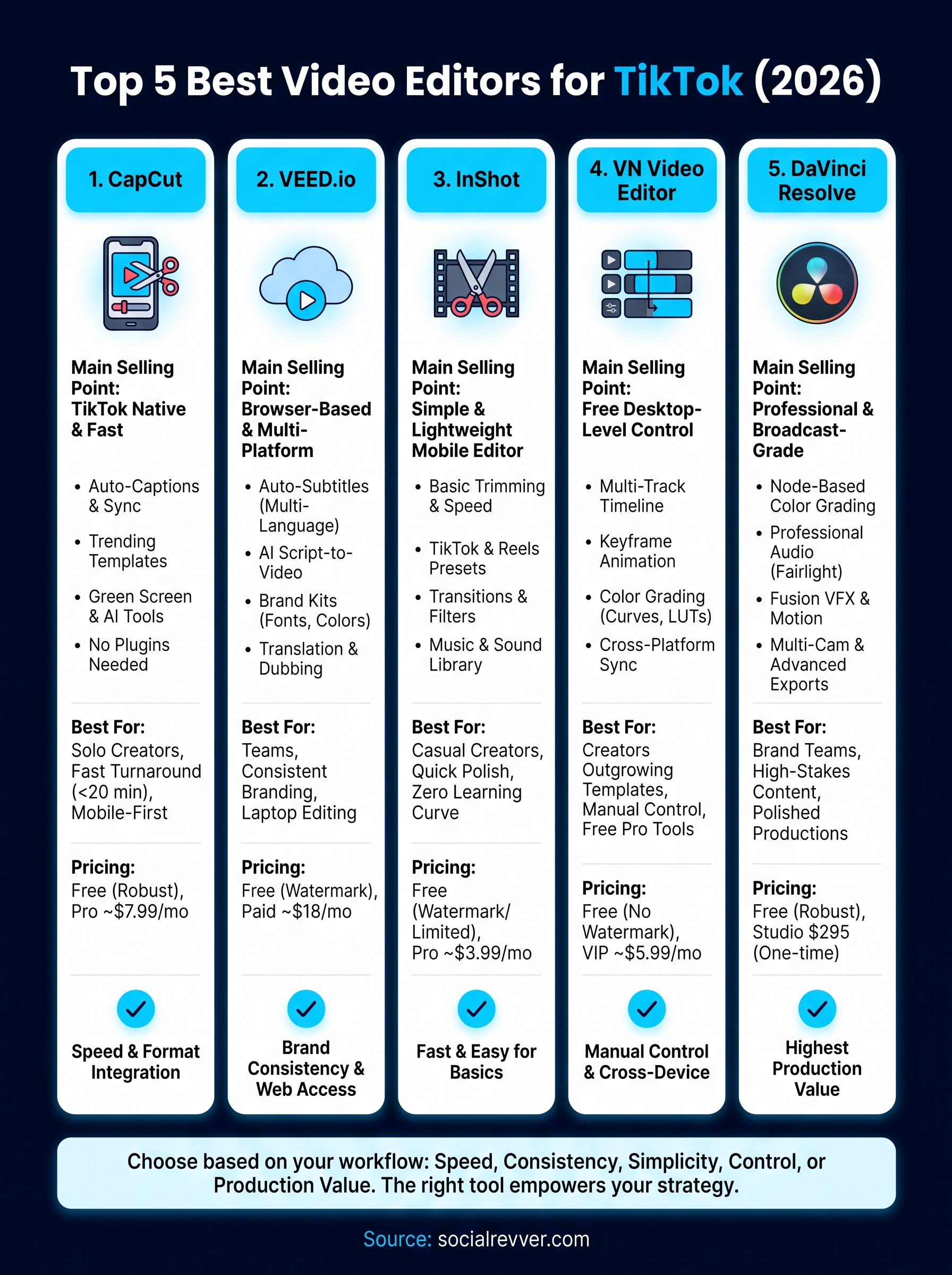
Pick based on your actual workflow, not the app with the most features. CapCut wins for speed and TikTok-native formatting, InShot works if you want zero learning curve, VN gives you real timeline control for free, VEED handles multi-platform branding, and DaVinci Resolve is for teams treating content like a production, not a hobby. None of these tools fix a weak posting strategy or inconsistent output, though. The editor just executes what you feed it.
That's the part most creators get stuck on: the system behind the software, not the software itself. If you're a founder or brand team ready to stop guessing which app or approach actually moves the needle, our team can build that structured content system around you. Get your free 40+ slide social media strategy and see what a real production pipeline looks like.